Pages

Showing posts with label happy snaps. Show all posts

Tuesday, 13 May 2014

Capture Life!

Hi everyone. It's Heather here today.

Last weekend, my husband and I volunteered to help out at a large fun bike ride. It was a freezing day and it drizzled occasionally but we had a great time. Because the ride wasn't a race, most people just took their time and enjoyed it.

I made this layout of the day using the May sketch for Dusty Attic with some fabulous Dusty Attic chippies and my 'Picture Perfect Today' kit from Scrappy Chat Designs.

Here's the sketch from the uber-talented Nadia Cannizzi.


I had taken plenty of photos on the bike ride day but they were taken on my phone and it was a dull day so the photos weren't the best. I decided to keep them small and use several of them to replace the one large photo in the sketch.

Here's my layout:


I do try to not use Tinby Metallic Melts on every layout I make with chipboard but it's so hard not to! The two products just seem to go hand in hand to me. I used the Melts on all the smaller chippie pieces. With the exception of the Dusty Attic chippies, everything on this page is from this month's Scrappy Chat Designs kit.

Some closies:


Heather.

www.heathermcmahon09.blogspot.com.au


Sunday, 27 April 2014

It's All About The Techniques.

Hi! It's Heather here. I hope you had a wonderful long weekend.

Today I'd like to share a post that's all about techniques. I'm using the April Scrappy Chat Designs kit. This page is a little less embellished than I would normally create, however I wanted to clearly show you the different techniques that you can use with this kit. I didn't want to hide the techniques with embellishments!

Firstly, my layout:


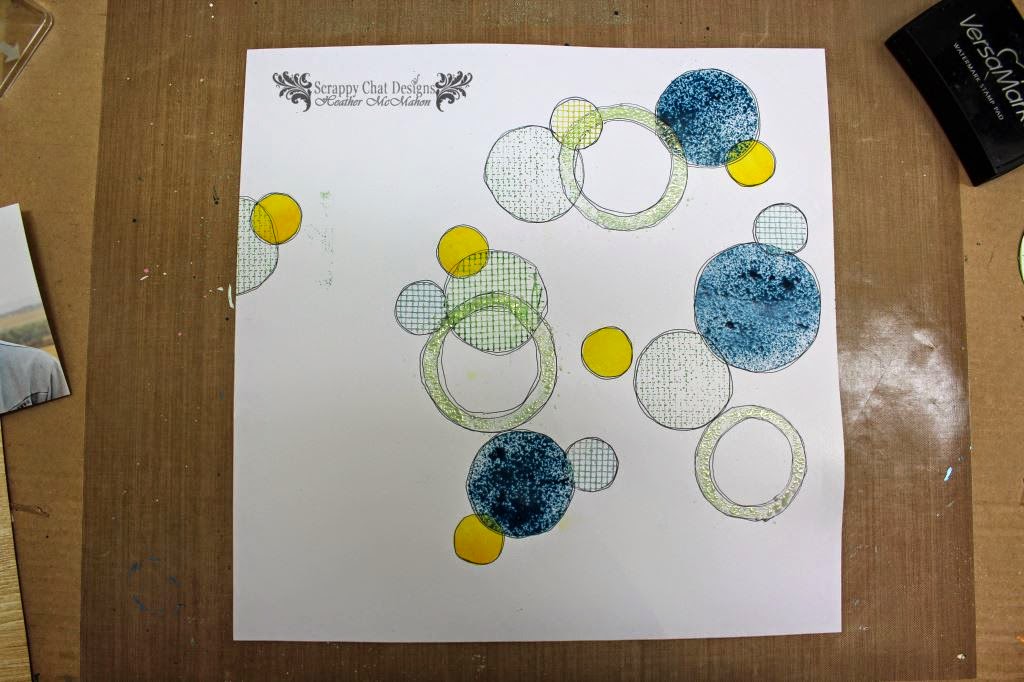
Now I'll show you all the different techniques I used to make that background.

1. Use a circle cutter to cut three circles in an old piece of paper.

2. Place the paper over your background cardstock and spray the irRESISTibles spray through the circles.

3. Your background should now look like this.

4. Trace a circle onto your plasters tape and cut it out. Use the self adhesive backing to stick it to a stamping block. Now use this as a stamp to add textural circles to your background.

5. Punch circles in scrap paper and apply ink through these circles onto your background.

6. Make smaller mesh circles by punching them out. Use these as stamps again but also add the coloured, punched circles directly to the page.

7. Cut circular shapes so that one fits inside another with a bit of space between. Sit them on your background so the new circles overlap parts of others. Attach with temporary adhesive it it helps. Apply clear VersaMark ink then add Tinby Metallic Melts. Remove the papers and heat the Melts.

8. The result should be something like this.

9. I then roughly outlined all the circular elements twice with a black pen.

I then added a title and fussy cut a few images from the papers to use as embellishments. I also use ink through one of the patterns on the stencil to create the border.

A few close ups of the finished layout:


Heather

Thursday, 24 April 2014

Making Memories

Hi There Scrappy Chat Friends,

It's Renee here, to share with you a layout I have made using the April Kit.

This is my first layout, out of 3 that I have made using this super trendy kit!!

I went a little chalkboard crazy with this layout. 


The layout started with the background.

I used the Crafter Workshop template from the kit in the bottom right with some textured paste.
I then also made a line across the middle using the same pattern from the template.

Because of how defined the spots were, I decided to make a border using the dot pattern.
This was all done using my Faber Castell White Pitt Pen. 
But you could use a white pen of any description.

Here is how it looked when I finished that process:


I then began layering the photos and some paper that I made to look like polaroid picture.

I cut up a few strips of the mesh that was included in the kit to show in the back of the pics.


There are so many funky pics that can be turned into embellishments from the patterned paper.
Using the paper called "Say Cheese" and the twine from the kit I made a Camera Banner.


I wrote my journalling in white pen.


The title was cut out using the paper from the kit and my silhouette machine.


I really loved the colors of this kit and how this layout turned out.

Thanks for stopping in.
And don't forget to check back on Sunday night, when the very talented
Heather McMahon shares another layout with you.